.jpg?width=218&height=98&name=Core42_Primary_Logo_RGB_Grit_Green_and_Impact_Green_Duo-Tone%20(2).jpg)
The ALERTS tab in the Compass Portal allows you to configure how and when you receive notifications related to Model Performance, Utilization and Resource Expiry.
Accessing the ALERTS Tab
To access the ALERTS tab:
-
Log in to the Compass Portal.
-
Click the Profile icon > Settings.
-
Navigate to the ALERTS tab.
You will see the options for configuring alerts.
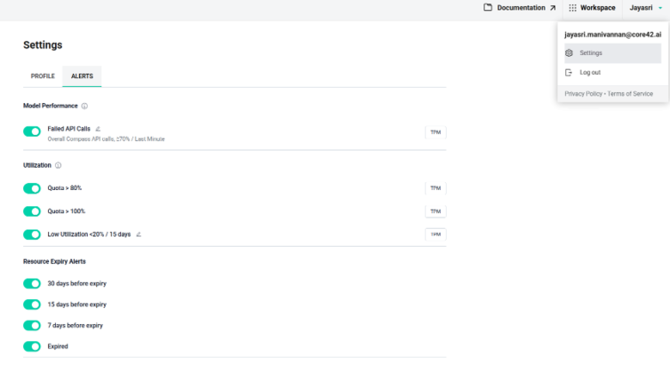
Available Alert Categories
You can enable or disable notifications for the following categories:
-
Model Performance
-
Utilization
-
Resource Expiry
Simply toggle the desired alert type to start or stop receiving email notifications.
Alert Types and Configuration Details
Model Performance Alerts
Configure notifications for failed API calls.
Toggle the alert option to receive the reminders.
Utilization Alerts
Configure notifications based on usage thresholds.
|
Utilization |
Description |
Notification |
|---|---|---|
|
Quota > 80% (Warning) |
Receive an alert when usage exceeds 80% of the quota. |
Checked per minute. Notification is sent only once per day. |
|
Quota > 100% (Exceeded) |
Receive an alert when usage exceeds 100% of the quota. |
Checked per minute. Notification is sent only once per day. |
|
Low Utilization < 20% |
Receive an alert when usage remains below 20% of the quota. |
|
To enable any of these alerts, toggle the corresponding option.
Resource Expiry Alerts
Stay informed about upcoming expirations and expired resources.
-
Notifications are sent 30, 15, and 7 days before and after the resource expires.
Toggle the alert option to receive these reminders.